Spoke Dispatch Route Planner: Review and Alternatives

Spoke Dispatch (formerly Circuit for Teams) looks great but creates messy routes. See our tests and 4 better alternatives.

- Spoke Dispatch (formerly Circuit for Teams) is a separate product from the mobile-only Spoke Route Planner.
- Spoke Dispatch is user-friendly with some strong features, but its route optimization and route management are weak.
- Routific is a better alternative for companies that care about efficiency, with much cleaner and more effective route optimization.
- Onfleet is a good option for on-demand or same-day deliveries, but is expensive.
- Optimoroute is good for specific use cases like multi-day routing and routes that return to a depot during a route.
- Route4Me is highly customizable, but its route optimization is lackluster and it has been getting increasingly expensive.
Spoke Dispatch is a popular route planning app for delivery services and couriers — but is it a good fit for your business? In this review we’ll look at where Spoke is great, where it’s lacking, what kinds of business needs it’s best for, and some alternatives.
💡 Spoke Dispatch was formerly known as Circuit for Teams. They changed their name in late 2025.
Spoke as a company actually has three separate products:
- Spoke Route Planner is a standalone mobile route planner app, aimed at individual delivery drivers.
- Spoke Dispatch is a desktop app for businesses that plan and dispatch routes for multiple drivers.
- Spoke Package Tracker is a portal where consumers anywhere in the world can track the delivery status of their packages.
In this review we’re focusing on products for delivery businesses that have multiple drivers, which means Spoke Dispatch (Circuit for Teams). If you’re a solo driver, check out our review of the best route planning apps for iPhone and Android instead.
What should you look for in route planning and delivery management software?
Planning routes for a team of drivers, and then managing them through the delivery process, is very different from just planning your routes for the day as a solo driver. As a dispatcher, delivery manager, or operations manager, you probably need to:
- Plan the most efficient routes to minimize time on the road and fuel consumption.
- Track delivery progress through the day and solve problems like missed deliveries.
- Notify customers accurately about when to expect their deliveries.
- Track delivery success and collect proof of delivery.
- Track driver performance and hours.
All the route planning and route optimization software we cover in this article includes real-time driver tracking, customer notifications, and proof of delivery — although the pricing may vary. We’ll mention notable features in each review.
Spoke Dispatch review
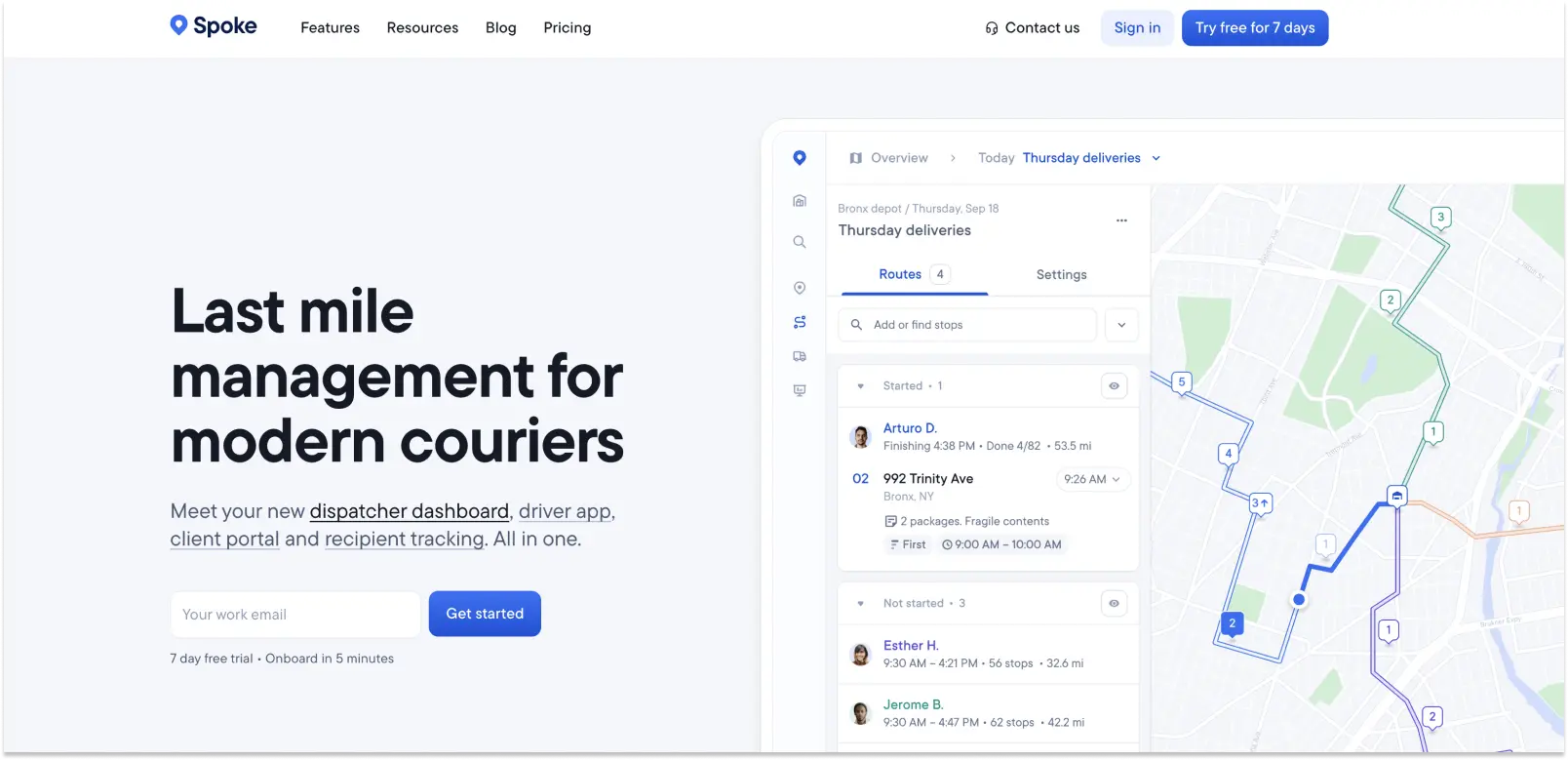
What Spoke Dispatch does right: Great design and a rich feature set
- Spoke Dispatch is beautifully designed and stands out for its ease of use.
- Shopify and Zapier integrations make it easy to import orders.
- Planners can choose what kinds of proof of delivery to accept (photo and/or signature), and whether POD is optional or not.
- They offer a good set of analytics, including calculation of cost per delivery and a breakdown of reasons for failed deliveries.
- Customer notifications can be fine-tuned for each customer to show a simple ETA, the customer’s location in the delivery queue, or a live tracking link so people can see exactly where their driver is.
- If the live tracking link is enabled, customers can leave notes for their drivers.
- Their customer support is well regarded.
Spoke Dispatch is also well integrated with the driver app, which makes sense for a product which started life as a mobile route planner app for solo delivery drivers.
In fact, some of Spoke’s best features are exclusive to its driver app. The most impressive are:
- A Package Finder feature which enables drivers to record where each package is placed in their vehicle.
- Drivers can create and edit their own routes on mobile.
- You can get driving directions inside the app itself, without needing to use another navigation app like Google Maps or Waze.
Overall, Spoke Dispatch is easy to use and feature-rich. Its biggest weakness, though, is in actual route planning and route management. We’ll look at that in the next section.
Where Spoke Dispatch is lacking: Inefficient route planning and lackluster dispatch tools
Spoke Dispatch’s biggest downfall in our tests is that its actual route optimization and route management is mediocre.
Take a look at the routes in this screenshot:

This is a classic example of what we call “spaghetti routes”. These are tangled and overlapping routes that aren’t actually workable for real-world businesses that care about efficiency. In particular:
- The purple route is extremely long and includes six bridge crossings. Bridges are often traffic bottlenecks, so truly efficient routes should avoid crossing major bodies of water as much as possible.
- Two stops in the area covered by the purple route have been allocated to the red route, creating an unnecessary extra leg for the red driver.
- Four drivers are available for these routes, but the blue driver has only been allocated one stop. That leaves all the drivers with wildly different route lengths and shift times.
Route optimization is complex, and routes often aren’t perfect first time. So in a situation like this, dispatchers need the ability to move stops around to create a more sensible set of routes.
Spoke Dispatch doesn’t offer an easy way to edit routes. You can move a stop to another day, or force a particular stop to be allocated to a particular driver. But making changes is awkward and difficult, and it doesn’t solve the main problem. Dispatchers and route planners need an easy way to edit routes, and Spoke Dispatch doesn’t have one.
This is a big efficiency problem. Route optimization algorithms do an amazing job of sorting stops into automatic routes, but they can’t be perfect. Then there’s the fact that every city has its own quirks and traffic patterns: Experienced dispatchers know them, but algorithms often don’t. For example, in Vancouver everyone knows to keep bridge crossings to a minimum if you want to avoid getting stuck in traffic. In other cities there will be tunnels, toll roads or traffic hotspots that pose the same problem. The ability to edit routes easily is an essential part of a smooth dispatch and delivery process.
No timeline view
Finally, Spoke Dispatch doesn’t offer a timeline view of its routes. Keeping track of delivery progress through the day is a big part of a dispatcher’s job, and it can be hard to do on a map, even with real-time updates that show driver positions. The problem gets more difficult the more routes you have.
As we noted above, when you’re managing a team of multiple drivers you need to be able to plan efficient routes, then track delivery progress through the day and solve problems like missed deliveries. For all its great features, Spoke Dispatch doesn’t do so well at this core task.
Spoke Dispatch Pricing

Spoke Dispatch offers three price tiers:
- Starter: $125 a month for up to 1,000 stops, then 4c per stop.
- Premium: $200 a month for up to 2,000 stops, then 6c per stop.
- Expert: $1,000 a month up to 12,000 stops, then 7c per stop.
Spoke Dispatch review summary
- Spoke Dispatch’s route optimization algorithm creates inefficient spaghetti routes.
- It’s awkward and difficult to edit routes.
- There’s no timeline view to help track progress through the day.
So if you’re a growing business that values efficiency, you may want to try an alternative to Spoke Dispatch. In the rest of this review, we’ll look at the top four alternatives to Spoke Dispatch: Routific, Onfleet, Route4Me and Optimoroute.
💡Seen enough? Try Routific free for 7 days — no credit card needed.
Alternatives to Spoke Dispatch
Routific: For businesses that care about efficiency
Super efficient route optimization and route management features are what make Routific stand out. Our algorithm development team has made it a priority to create routes that are driver-friendly and make sense for business workflows.
Take a look at this screenshot:

As you can see, these routes are a lot neater than the ones produced by Spoke Dispatch, clustering stops so that drivers don’t have to overlap their routes too much.
We’ll admit it’s not perfect, though! There is one blue stop near the middle of the map that might make more sense on the pink route. To change it, all the planner or dispatcher has to do is drag and drop the stop to the desired route — and that’s it. It’s just as easy to move groups of stops.
Routific’s dispatcher view also includes a timeline, which makes it much easier to keep an eye on route progress through the day, and see where each driver is at.

What about other features? It depends on what’s most important to your business:
- Integrations: Spoke Dispatch has a slight edge here with its Shopify and Zapier integrations. Routific has a 2-way API to make it easier to import and export info from your order management system or CRM, but we don’t yet have app-specific integrations.
- Proof of delivery: Routific and Spoke Dispatch both enable photos and signatures as proof of delivery.
- Customer notifications: Routific and Spoke Dispatch both offer SMS and email notifications, as well as a live delivery tracker. Spoke Dispatch allows customers to send messages via the live tracker link as well.
- Analytics: Routific and Spoke Dispatch both offer route and driver analytics.
- Driver app: Routific and Spoke Dispatch both have free mobile apps that drivers can use to receive and manage their routes. Spoke also has the separate Spoke Route Planner standalone app for solo drivers, which is paid.
💡Want to see the difference for yourself? Sign up for a free trial of Routific — no credit card needed.
Pricing
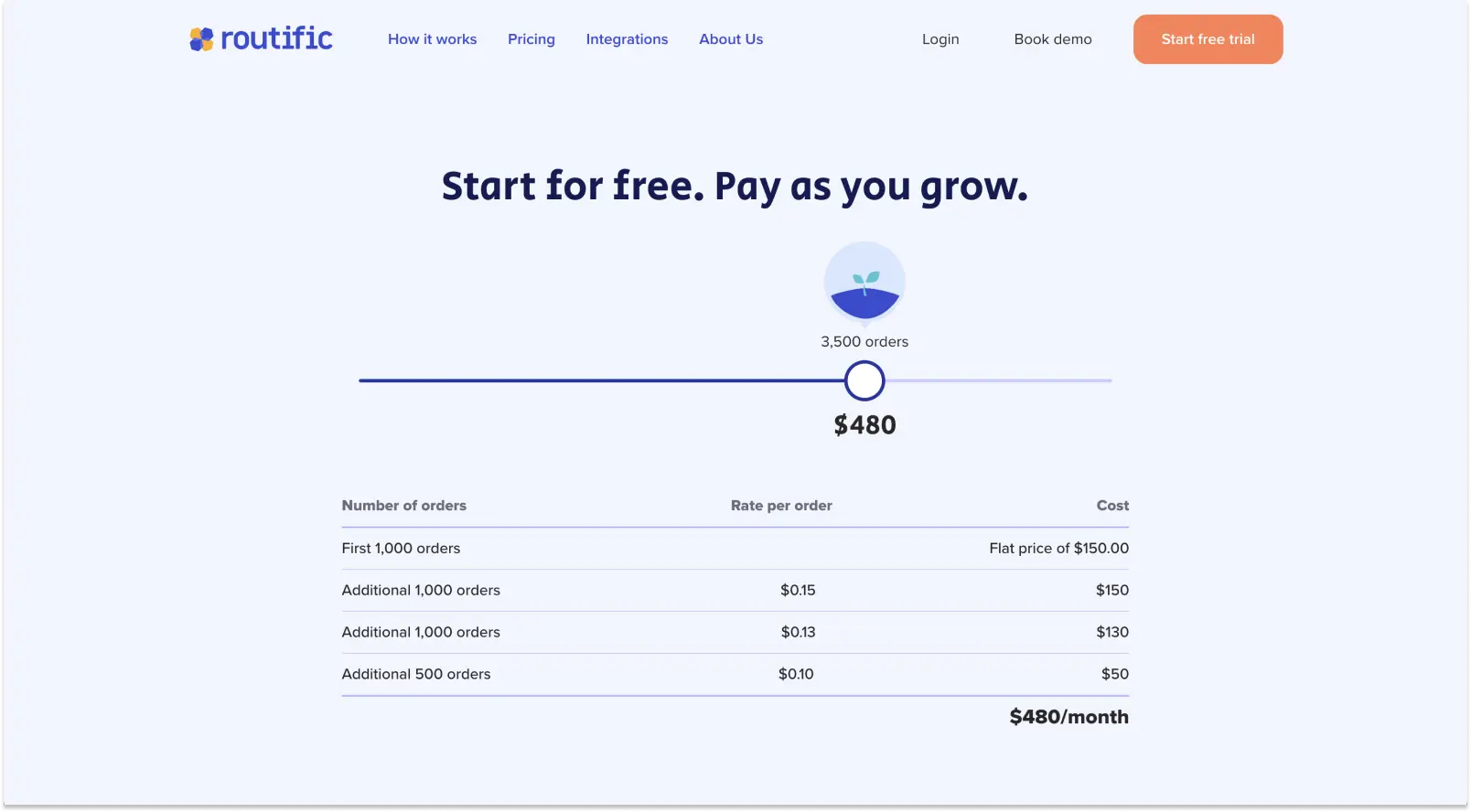
Like Spoke Dispatch, Routific has a sliding scale of prices depending on the number of orders routed per month:
- Up to 100 orders a month: Free
- 101 to 1,000 orders a month: $150
- 1,001 to 2,000 orders a month: Add 15c per order
- 2,001 to 3,000 orders a month: Add 13c per order
- 3,001 to 5,000 orders a month: Add 10c per order
- 5,001 to 10,000 orders a month: Add 8c per order
- 10,000 to 20,000 orders a month: Add 5c per order
- 20,001 to 50,000 orders a month: Add 3c per order
- Above 50,000 orders a month: Talk to us!
All plans offer the full feature set including unlimited team members, customer notifications via email, and proof of delivery.
Comparing exact pricing can get tricky depending on the size of your business and the features that are most important to you. We recommend spending some time comparing pricing options and testing, to see which delivery management tool offers the best value for money in your business.
What about other alternatives? Onfleet, Optimoroute and Route4Me are the most relevant. We’ll look at each of them in turn.
Onfleet: Good for on-demand deliveries that need ID verification or barcode scanning

Onfleet is a solid route planner with some standout features. The big one is that it has great features for on-demand deliveries. This makes it a good choice for couriers who do a lot of single-package trips, and for restaurants.
A more detailed list of what makes some businesses choose Onfleet includes:
- Automated driver assignment and dispatch to give customers a self-service option.
- Barcode scanning.
- Age verification: In-app age verification at the point of delivery is a dealbreaker for companies that deliver alcohol or cannabis.
- Customer feedback: Onfleet has a feature that lets customers rate their delivery experience.
On the downside, Onfleet’s route quality is mediocre. Most of the complaints we hear from Onfleet users are about poorly optimized routes, with lots of criss-crossing and inaccurate addresses.
Onfleet is also not at all user-friendly. There’s a steep learning curve for people just starting out, and the app feels really old-fashioned and clunky. Even worse, some really important route management features are absent:
- It’s not possible to view all the routes for a single day at once. You can see all the stop pins, or one route at a time; but not all the day’s routes. There isn’t even any color coding to show which stops are allocated to which routes.
- The interface doesn’t show real routes – just straight lines between stops.
- It’s difficult to make changes to routes.
- There’s no timeline view.
- There are no route stats for the day, like the total number of stops, shift times, or distance.
This can get really confusing and frustrating for a dispatcher. We know people have questions like: What is my total mileage? How many driving hours in total and across my drivers?
Without this info, and without a way to see all your routes, you’re in the dark. You simply have to trust that the algorithm is doing its job and hope for the best. We don’t think that makes for a great user experience.
Pricing

The bottom line: Onfleet is expensive, and their pricing is inflexible.
- The $619 per month starting price includes up to 2,500 stops per month. For comparison, 2,500 stops would cost $365 with Routific.
- There’s a big jump to the next tier at $1,349 per month for up to 5,000 stops.
- Enterprise pricing for 10,000+ tasks per month starts at $3,099.
This lack of flexibility can leave some of Onfleet’s customers having to choose between paying for overages, or paying for capacity they don’t use.
Optimoroute: Good for specific use cases like multi-day routing

Optimoroute is a lot easier to use than Onfleet, and has a couple of unique features that make it a good choice for some businesses. The standouts are:
- Weekly planning: This is what we call multi-day routing at Routific. It allows customers to plan routes up to five weeks ahead NOFOLLOW, and allocate stops automatically to the most appropriate days and times.
- Return to depot: Optimoroute gives route planners and dispatchers the ability to schedule routes that include trips back to the depot for reloading during the day. Spoke Dispatch and Routific both include a return to depot at the end of a shift, but not during a shift.
- Breadcrumb trails: This feature tracks vehicle movements so that dispatchers can compare actual vs planned routes.
- Individual driver profiles: Optimoroute’s detailed driver profiles include information like breaks and overtime, skills, vehicle types, service areas they should stay in, and even cost and speed settings. This makes OptimoRoute a good option for field sales and service organizations.
- Barcode scanning: Enables drivers to scan barcodes or QR codes for proof of delivery.
When it comes to drawbacks, Optimoroute shares many of the same problems as Spoke Dispatch and Onfleet:
- Route quality is lackluster, with lots of spaghetti routes.
- Route editing is not great.
- Start locations are inflexible. It’s not easy in Optimoroute to adjust the start locations for routes. This can make life difficult for dispatchers who work with contract drivers, where route starting points can change from day to day.
Pricing

Optimoroute’s Pro plan is billed per driver, rather than per stop. If you sign up for a full year, OptimoRoute’s pricing tiers are:
- $35.10 per driver per month with a limit of 700 orders.
- $44.10 per month for up to 1,000 orders, real-time tracking and proof of delivery.
- Custom pricing for more complex needs is also available.
Per-driver pricing makes sense if you have a fixed number of drivers — although the costs can add up quickly. At five drivers and 5,000 orders per month, for example, this is what you’d pay for different route planners:
- Spoke Dispatch: $285 or $380 per month, depending on your plan.
- Routific: $630 per month
- Onfleet Scale plan: $1,349 per month
- OptimoRoute Pro plan: $220.50 per month.
Optimoroute makes sense if you have a small number of regular drivers. But if you have a variable number of drivers, which is quite common, you may end up paying for drivers who only work a handful of days a month.
OptimoRoute offers a generous 30-day free trial, but the trial is limited to 250 stops so it’s hard to assess how performance will scale.
Route4Me: Great for customization
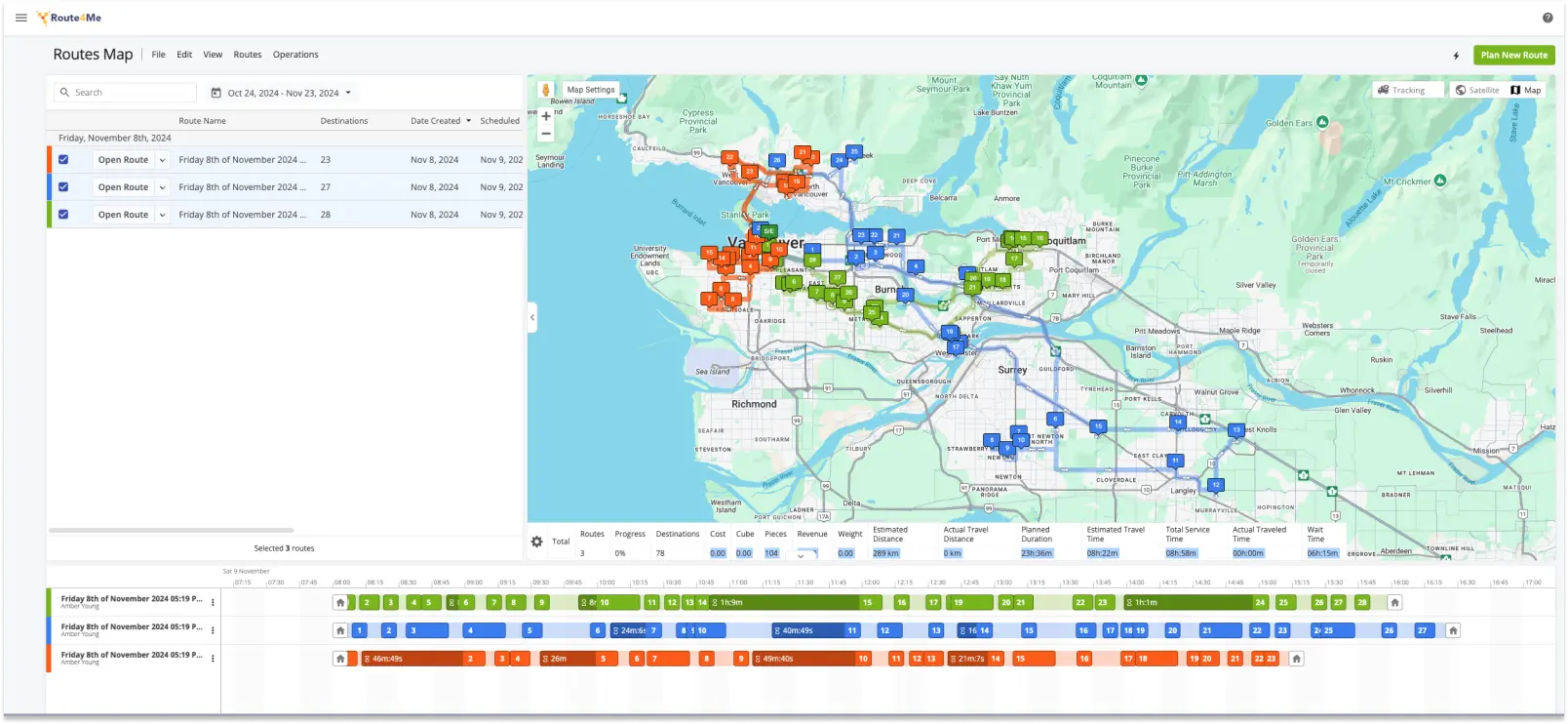
Route4Me is one of the original route planning software tools. Its main strength is an extensive marketplace of add-on features that allows customers to mix and match modules for maximum flexibility — although this does come at an extra cost.
We’ve also noticed that some of the things Route4Me charges extra for, like time windows and photo proof of delivery, are standard features in other apps like Spoke Dispatch and Routific.
Here are the places where Route4Me shines compared to the other route planners in this review:
- Truck routing: If your fleet includes trucks that can’t go on all roads or fit under all bridges, you need a route planner that takes those constraints into account. Some Spoke Dispatchand Routific customers use the Hammer truck routing app as a workaround, but it’s only available in the US. Route4Me’s mixed vehicles routing and commercial vehicle routing add-on components handle these scenarios.
- Integrations: Route4Me offers integrations with e-commerce platforms including Shopify, WooCommerce, and Magento. That’s an even bigger selection than Spoke Dispatch's.
Other features that used to be Route4Me exclusives are now available elsewhere:
- Territory assignment: Route4Me enables customers to carve their delivery or service area up into different zones and assign each to a regular driver. This helps drivers become familiar with their territories and delivery routes. Routific’s Driver Familiarity feature offers an automated way to achieve the same goal: The software learns over time which drivers are most familiar with each area, and automatically suggests a driver assignment for each route based on their familiarity score.
- Recurring routing: Route4Me has an add-on component that makes it easy to handle regularly recurring routes. Routific’s Copy Routes feature does the same job, enabling dispatchers to easily copy any route to a new date.
Where does Route4Me fall down? In the usual places:
- Route4Me’s route optimization is not driver friendly.
- ETA estimates are suspect. Accurate delivery time estimates are absolutely critical to an efficient process — when ETAs are wrong, so are driver shift lengths and customer notifications. But in our tests, Route4Me kept coming up with time estimates we just didn’t believe. For example, on one route section that Routific and Google Maps both estimated would take 18-19 minutes, Route4Me estimated just 10 minutes.
Pricing
As of January 2026, Route4Me’s pricing is not publicly available, and they no longer offer a 7-day free trial. You will have to contact their sales team to discuss pricing, and to test the software.
These are the three Route4Me pricing tiers that were published before January 2026:
- Basic route optimization started at $400 a month for a 5-user plan. This allowed optimization for one driver or route at a time, but not across routes or depots.
- Multi-driver and multi-depot optimization started at $600 per month.
Additional modules like SMS customer notifications, curbside delivery, or field service routing are add-ons that will increase the cost.
This new secrecy makes it hard to assess what value for money Route4Me provides. But if your business needs some of their advanced modules like curbside routing, it might be worth it.
How we tested and ranked the alternatives to Spoke Dispatch
We tested all five delivery management platforms in this review using real-life data, with stops in our home city of Vancouver. For each app, we signed up for a new account to assess how easy it is to get started, and then went through the entire route planning process. We uploaded orders, optimized routes, inspected the routes and made changes, then dispatched them to drivers.
We realized that when it comes to some basic functionality you’d expect in a delivery management solution, there’s very little difference between Spoke Dispatch, Routific, Onfleet, Optimoroute, and Route4Me. They all have:
- Live GPS tracking
- Proof of delivery
- Customer notifications with a live tracking link
- Standalone driver apps for both Android and iOS
The biggest difference is in the quality of route optimization and route management tools, where performance varies widely — so that’s what we focused on.
Why are route optimization and route efficiency important?
Last mile delivery is expensive — up to 40-50% of total shipping costs, according to most estimates. So cost optimization is an important part of efficient delivery management — and the single most important number you need to track is cost per delivery.
The two biggest components of cost per delivery are:
- Driver wages (usually 70 to 80% of the total).
- Fuel costs.
You can’t realistically lower wages, and you can’t change the fuel price. That leaves route density, or the number of deliveries you can make per hour, as the only important factor you can control.
An efficient route that covers more stops per hour results in less total distance traveled, less fuel used and less drive time. So as a route manager, route efficiency is the most effective lever you can pull to make your delivery operations more efficient, and your business more profitable.
Driver acceptability and the “spaghetti routes” problem
As much as we love algorithms, we have to admit: They’re not great at common sense. In route planning, this often manifests in what we call “spaghetti routes”. Take a look at these screenshots:
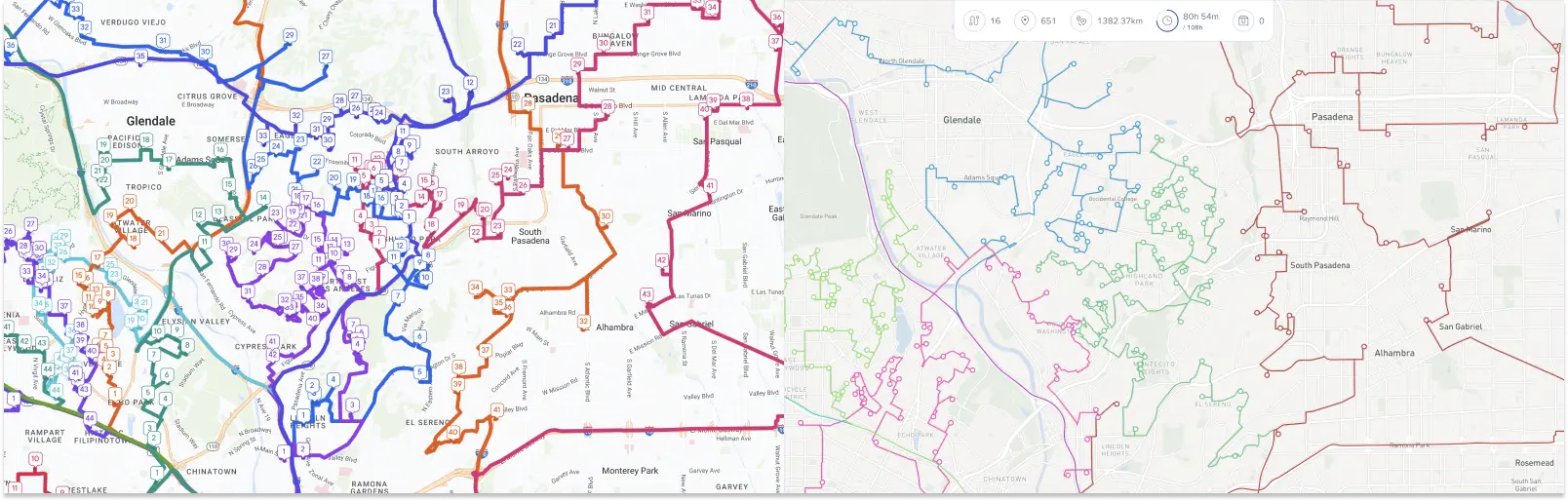
See that tangled mass of colorful spaghetti on the left? Routes are criss-crossing and overlapping, and multiple drivers are going to the same area. From years of talking to route planners, dispatchers and drivers, we’ve learned that drivers absolutely hate routes like this. The routes might meet some kind of mathematical definition of “best route” but they make no sense to humans. No driver wants to pass one of their colleagues on the road going to the same place they just left! That’s why our algorithm development team has put so much effort into avoiding spaghetti routes.
Additionally, our ETAs are highly accurate, powered by 179 machine learning models all across the globe that incorporate tunnels, bridges, and busy highways. Not only are our routes highly optimized, they are also realistic.
Summary
Spoke Dispatch is a simple, well-designed piece of software that can be very valuable for any small business in the early stages. As soon as you scale beyond just a few dozen deliveries per day, you’ll likely hit some of their shortcomings.
As your delivery business grows, efficiency becomes increasingly important. A difference of 15% in mileage for a few dozen deliveries might not mean much — but for larger operations, this difference could make or break your business.
Frequently Asked Questions
What is the difference between Spoke Route Planner and Spoke Dispatch?

Spoke Route Planner (previously Circuit Route Planner) is a highly-rated mobile app for individual delivery drivers to plan their daily routes. Spoke Dispatch (previously Circuit for Teams) is for business teams that include a planner/dispatcher and several drivers. It includes a browser-based desktop planning app and a free mobile app.
Why are spaghetti routes a problem in route optimization?
A good route is much more than just the most mathematically efficient route. Delivery drivers have to navigate these routes in the real world, and they dislike criss-crossing, overlapping routes — what Routific calls “spaghetti routes”. Routific's algorithm is specifically engineered to eliminate this problem, which remains common with less sophisticated optimization engines. Our routes prioritize both mathematical efficiency and driver acceptability.
What size of business is Routific good for?
Routific customers deliver anywhere from a few hundred to several thousand orders a day. They share a need for reliable, efficient route optimization with core delivery management features like easy route editing tools, a free mobile app for drivers, proof of delivery, customer notification tools, and analytics and delivery data.

The 10 Best Free Route Planners In 2026

Route Planning Vs Route Optimization: What’s The Difference?