Route4Me Alternatives: Route Planners That Cost Less

Route4Me’s pricing model can make it expensive compared to competitors. Here’s the latest info for 2026 on how it compares to its leading competitors, based on public reviews and tests.
- Route4Me is a well established and popular route planner, but it doesn’t meet the needs of every business.
- As of early 2026 Route4Me’s pricing is no longer public, but historically their pricing has been higher than many of its competitors.They no longer offer a free trial.
- When the quality of route optimization and dispatcher tools are most important, Routific beats Route4Me — and it has great ease of use and customer support.
- For businesses who prioritise ease of use for drivers, Spoke Dispatch is a good alternative to Route4Me.
- Badger Maps is the standout winner for sales call routing, with integrations to leading CRM systems.
- Optimoroute is a middle-of-the-road Route4Me alternative with some features others lack, like return-to-depot routing.
- Onfleet supports on-demand delivery scheduling.
- The best way to choose route planning and delivery management software is to test it in your own business, using your own data and processes. Most vendors offer free trials, so that is a good place to start.
Route4Me is one of the original route planning and route optimization tools, with a strong existing user base. It has a well-developed marketplace of add-on modules so it’s easily customizable to different needs, from last-mile delivery businesses to field sales and service.
In this article, we’ll do three things:
- Discuss the major strengths and weaknesses of Route4Me, and how it stacks up against its competitors.
- Look at Route4Me’s cost. They no longer publish their pricing as of early 2026, so we’ve based our info on historical data.
- Evaluate the best Route4Me alternatives for different business needs.
Choosing route optimization software can be difficult because everybody promises the same things: streamlined operations, lower costs, a better customer experience, and so on. Everybody has a mobile driver app for Android and iOS, and live tracking of deliveries. But when you try to dig beneath the surface, it’s surprisingly hard to find concrete information. Each route planner app is different under the hood, they have different pricing models, and they meet different business needs.
To add to the confusion, software review sites tend to group last-mile delivery management, e-commerce shipping, third-party logistics (3PL), and fleet management all into the same category. That makes it hard to filter out what’s actually relevant and find the alternative that’s actually right for you.
So to make it clear: Route4Me is specifically built to streamline the last-mile delivery process, and to a lesser extent field sales and service routes. Those will be our focus in this article. Long-distance shipping, 3PL operations, and fleet management need different solutions.
We’ll cut through the confusion, based on information from a few different sources:
- Company websites.
- Published customer reviews on independent sites like Capterra and G2.
- Our own tests of Route4Me alternatives.
- Information we’ve heard privately from customers.
Route4Me’s main strengths and weaknesses

Strengths
Route4Me’s major strength is its flexibility. Customers can mix and match modules to create a software solution that suits their needs. For example, you can add on modules for:
- Curbside pickup
- Avoiding left or right turns
- Driver skills and vehicle attributes
Although its website looks a little outdated, some users report that Route4Me’s actual user interface is relatively simple and friendly — especially if you’ve never used route planning or delivery management software before.
There are also a number of different options for adding address data: Route4Me offers the usual copy-paste and Excel or CSV upload, but also direct import from Google Drive, Dropbox, Box, Xero, and Quickbooks. You can even scan printed documents to extract address information.
Territory assignment is another strength. You can carve your delivery or service area up into different zones and assign each to a regular driver. This helps drivers become familiar with their territories and delivery routes, which can save a lot of time.
Here’s what actual customers say:
We have different routes every day and this has sped up the routing process greatly. Easy to use and train new employees. — Jacob A, midsize Warehouse Manager.
Route4Me has allowed us to streamline a huge part of our business saving us hours of work a day. The support is quick, helpful, and always available. — G2 verified user, SMB.
Weaknesses
Route4Me’s modular structure does make it flexible, but many of the add-on modules are features that come standard in other routing software. Both Routific and Spoke Dispatch, for example, build in the ability to schedule driver breaks out of the box. With Route4Me, it’s a paid extra.
Route4Me is also expensive. When it last published its pricing information, the starter tier cost $400 a month — and that’s without only the most basic route optimization! The cost of extra modules can add up fast, too. Many of the most commonly used modules are free, but others cost — a lot, in some cases.
The cost has increased a lot over our subscription, and the value overall for us has decreased due to this. The sales team has not allowed as much flexibility to work with us as they have in the past. — Jessica Y, Routing Manager.
Finally, Route4Me’s actual route optimization is weak. Its algorithm produces short, mathematically efficient routes: but the shortest route is not necessarily the best route. That’s because routes have to be driven by actual humans, and what looks good to an algorithm can look crazy to a human. Route planning apps with poorly developed route optimization algorithms often produce criss-crossing routes that loop back on themselves, or routes where two addresses on the same block will be served by different drivers.
There are other problems with Route4Me’s route optimization:
- Route4Me assumes that all routes are the same: starting from the same point, with the same start and end times, identical vehicles, and so on. So if you have morning and afternoon routes, or routes starting from different depots, it won’t serve you well. There is a “mixed vehicles” add-on, but it doesn’t solve the whole problem.
- In our testing, Route4Me made inaccurate ETA estimations. For example, on one route section that Routific and Google Maps both estimated would take 18-19 minutes, Route4Me estimated just 10 minutes. Underestimating journey times can lead to lots of overtime, late deliveries, and a very poor customer experience.
- Users report that vehicles are sometimes sent to the wrong addresses.This can be an indication of poor geocoding.
Route4Me automatically optimizes its routes to use the minimum number of vehicles, and this setting can’t be changed. This makes things awkward if you have your own fleet and drivers — Route4Me could leave one driver sitting idle while another works overtime.
Here’s what their customers say on independent review sites:
I don't think the optimization is the best. — Kofi A, SMB Director.
The optimization is off always. I have stopped using it for that. — Vaughn A, SMB President.
Occasionally routes to incorrect address. — Lori P, SMB customer service.
Route4Me pricing

As of January 2026, Route4Me’s pricing is not publicly available. You will have to contact their sales team to discuss pricing, and to test the software.
These are the Route4Me pricing tiers that were published before January 2026:
- Basic route optimization started at $400 a month for a 5-user plan, or $80 per user per month. This allowed optimization for one driver or route at a time, but not across routes or depots.
- Multi-driver and multi-depot optimization started at $600 per month for 5 users ($120 per user per month).
Additional modules like SMS customer notifications and curbside delivery are add-ons that will increase the cost.
It’s also worth noting that Route4Me has removed their 7-day free trial option as of early 2026.
Top Route4Me alternatives
1. Routific: For the best route optimization and powerful route management

Routific is designed specifically for small- to medium-sized businesses that do local deliveries. The last mile is notoriously the most expensive part of the supply chain, and that’s where more efficient routing can have a massive impact on profitability.
Based on our testing, we’re confident that Routific offers much more sophisticated route optimization and route management than Route4Me.
In particular:
- Our routes are clean and untangled. There is less of the criss-crossing that annoys drivers and undermines their faith in a route management app.
- We have more accurate traffic prediction and ETAs based on machine learning.
- Routific can accommodate mixed route types, including routes with different start times and different vehicle types.
- Routific optimizes for multiple drivers or vehicles out of the box, on all price tiers including our free plan.
- Unlike Route4Me, Routific gives you a choice of what to prioritize during route optimization. Do you want to use the minimum number of vehicles, balance workloads across a number of drivers, minimize the number of visits per vehicle, or choose the shortest overall distance?
In addition, Routific offers more powerful daily route management tools for dispatchers, including:
- Timeline and map views of the day’s route progress.
- Easy drag-and-drop route editing within and between routes.
- A patent pending “draw route” tool that lets users tell the algorithm their desired route shape and direction with a simple swipe of the mouse.
- A driver familiarity feature that automatically assigns drivers to the routes or areas they are most familiar with. This serves the same purpose as Route4Me’s territory management feature.
💡 Want to see for yourself? Check out our 7-day free trial, or contact our sales team for a demo of our more advanced features.
Other advantages of using Routific
- We focus on medium-sized and small businesses, which means we pay special attention to being easy to use.
- Our customer service is superb, with a customer support team featuring real people (you’ll get to know Chris, Sophie, and Jian).
- Our pricing structure is simple and flexible. Most of our features, including full-service route optimization, are available on our lowest price tier.
What Routific can’t do (yet)
- Multi-day planning
- Return to depot (although there are workarounds for this)
- In-app driver chat
- Direct communication between drivers and customers
If any of these features are deal-breakers for you, then Routific is not the right choice for your business right now.
Routific customer reviews
The ease of use, simplicity, and customer service is second to none. I have tried and demoed every routing tool out there and none come close to Routific with ease of use and simplicity. — Morgan H, SMB CEO
It's intuitive, it has awesome features like the client notifications, and everytime I had a question I was serviced in a very comprehensive and friendly fashion. They didn't stop until I said I was satisfied. — Jonathan K, SMB owner.
Platform was straightforward and easy to use for the admin and drivers. Clean and user friendly, functional and not ‘cluggy’ like some of the other platforms I have trialled. — Andy L, midmarket Managing Director.
Routific pricing

Routific’s freemium pricing model is based on the number of orders scheduled, rather than the number of users, drivers or routes.
- The first 100 stops every month are free, to accommodate the needs of very small businesses, non-profits, and occasional users.
- 101 to 1,000 orders a month: $150
- 1,001 to 2,000 orders a month: Add 15c per order
- 2,001 to 3,000 orders a month: Add 13c per order
- 3,001 to 5,000 orders a month: Add 10c per order
- 5,001 to 10,000 orders a month: Add 8c per order
- 10,000 to 20,000 orders a month: Add 5c per order
- 20,001 to 50,000 orders a month: Add 3c per order
- Above 50,000 orders a month: Talk to us!
2. Spoke Dispatch: For a driver-first approach and great ease of use
Spoke (formerly Circuit) was first of all a mobile route planning app for delivery drivers, later adding the Spoke Dispatch platform to accommodate delivery businesses with multiple vehicles and drivers. This heritage is still reflected in its clean and user-friendly interface — but it does mean that features for larger businesses that need to plan multiple, complex routes can be lacking.

Spoke Dispatch's main strengths and weaknesses
Strengths
Spoke’s original driver app has over 100,000 users around the world. This widespread adoption means a lot of drivers are already familiar and comfortable with it, which can make a delivery planner or dispatcher’s job a lot easier.
It also means Spoke has the resources to keep developing and updating its software, so this is unlikely to be a choice that leaves you stuck in a dead-end a few years down the line.
The Spoke driver app also includes a feature that helps drivers find each package inside their vehicle. At the loading stage, each package can be marked front/middle/back, left/right, and floor/shelf. This can help save a lot of time at each delivery stop.
Weaknesses
Spoke’s major weakness is lackluster route optimization:
- You can’t edit routes once they’ve been optimized. Individual drivers can change stop order inside their mobile apps, but it’s not possible at the planning stage.
- Routes are messy, with a lot of crisscrossing and overlap.
The tools for planners and dispatchers are also lacking:
- Spoke Dispatch lacks a timeline view, unlike Route4Me and Routific.
- It also doesn’t allow drag-and-drop route editing.
For these reasons, Spoke is probably best suited to smaller operations with no more than a handful of routes to manage. Once you’re running five routes or more per day, you will need the more powerful dispatch management features of something like Routific.
Customer reviews
I love how easy Circuit is to use. It is user friendly and easy to understand. — Hannah H, SMB business owner.
Circuit is improving all the time. It is a great product for the price, and the team seems to actively be working to upgrade it. Their customer service is accessible and they listen and work to fix any issues that arise. — Katherine H, midmarket sales professional
For our business, and the amount of trips that we have per day we believe it's pretty pricey. — Tony C, SMB CEO
Overall the multiple clicks to add a stop, make changes to a route is a bit cumbersome. It would be nice to streamline that process. — Derek N, midmarket retail Manager
I do not like that sometimes when the routes are being created, they aren't always equally distributed between the drivers. Sometimes I have to manually adjust the route to better meet the needs of the drivers. — Mario M, non-profit Program Manager
Pricing

Spoke Dispatch offers a 7-day free trial — although you will need to give credit card details to set up a trial, and it will auto-charge unless you cancel.
Spoke Dispatch offers three price tiers:
- Starter: $125 a month for up to 1,000 stops, then 4c per stop.
- Premium: $200 a month for up to 2,000 stops, then 6c per stop.
- Expert: $1,000 a month up to 12,000 stops, then 7c per stop.
3. Badger Maps: Best for field sales
Badger Maps is designed specifically for field sales teams, so it’s a great choice if deliveries are not your major need. It has all the usual features a route planner needs, like real-time tracking and a mobile app, but it’s the CRM features that make it stand out.

Main strengths and weaknesses
Badger Maps shines when it comes to features designed to make life easier for sales and service professionals:
- Lead generation: Generate leads based on the user's location and target demographics.
- CRM integration: Badger Mapping can integrate with most popular CRM systems, including Salesforce, Microsoft Dynamics, Zoho, HubSpot, Insightly, and NetSuite.
Looking at online customer reviews, their customer service is also highly rated. Some users mention that the cost can be high for solo operators.
It’s hard to identify any major weaknesses for Badger Maps. Looking at the list of alternatives suggested by review sites, they’re mostly pure CRM products. Badger seems to have hit a sweet spot of filling a route-planning gap in CRM software. It’s not a product to consider for delivery management, but if your use case is sales calls then this is a clear frontrunner.
Customer reviews
I use this great service daily. Don't know how a person can cover a large territory any other way. The mapping and optimization it has lets me pick up three or more calls per day. — Fred L, midmarket Territory Sales Representative
The prospecting feature is a little dull to me unfortunately. I use seamless.ai for prospecting which gives me more detailed information. For example, I can find a person by their title at the company along with their email and cell phone number. — Daniel, Industrial Account Manager
Pricing
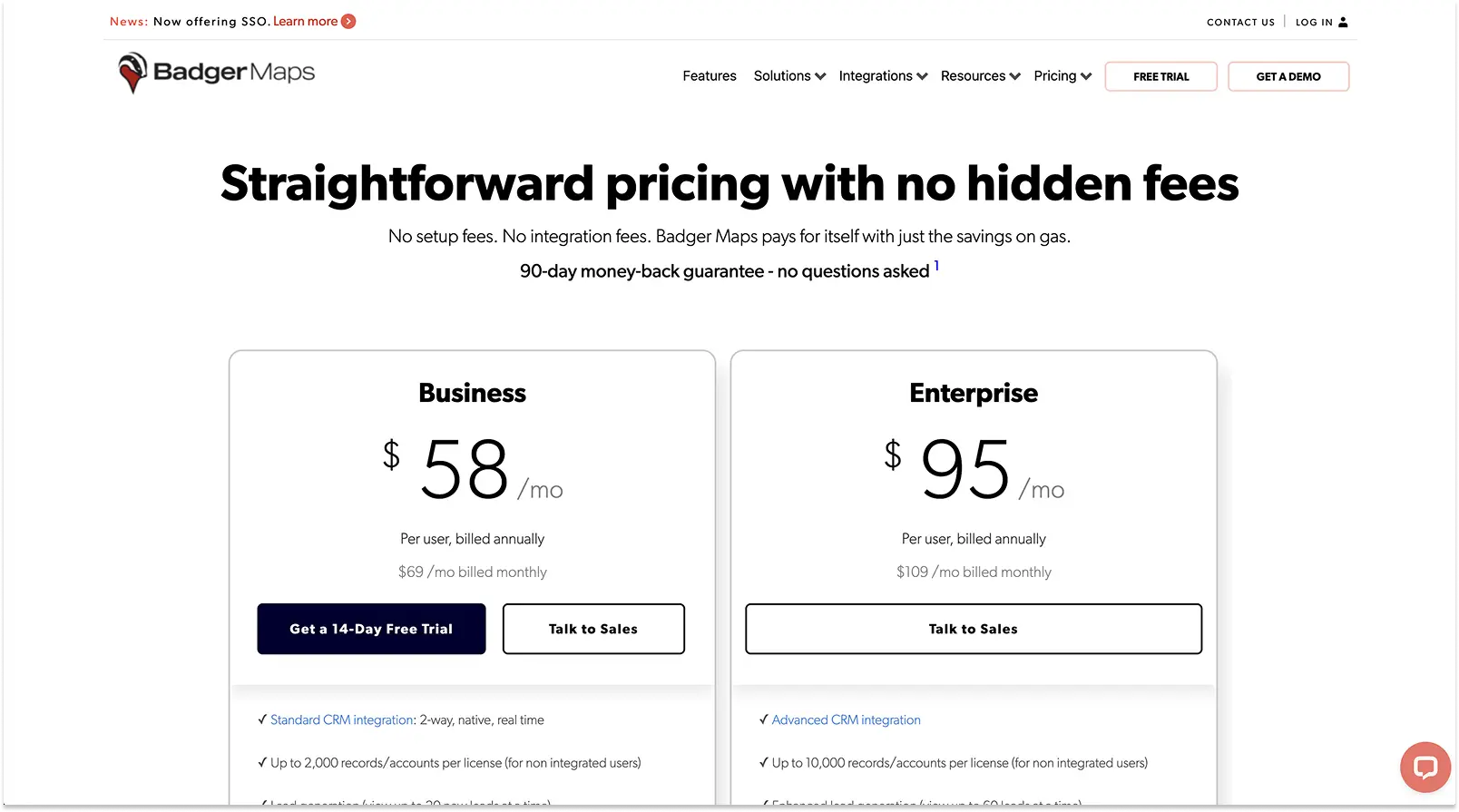
Badger Maps pricing has two tiers:
- $58 per user per month for independent salespeople
- $95 per user per month for large companies.
4. OptimoRoute: For advanced route planning with return-to-depot functionality
OptimoRoute is a powerful routing app with a lot of flexibility, and some unique features — but it does take some time to learn and understand.

Main strengths and weaknesses
Optimoroute’s advanced routing functionality includes the ability to schedule reloading at a depot during the day, a feature other Route4Me competitors like Routific lack. Other popular features include:
- A "breadcrumb” feature that tracks vehicle movements, so dispatchers can compare the routes actually driven to planned routes.
- Individual driver profiles include shift schedules (including breaks and overtime), start/end locations, skills, vehicle types, service areas you want them to stay in, and even cost and speed settings. This makes Optimoroute another good option for field sales and service organizations.
- Customers can rate their delivery experience and leave comments.
Despite some of these advanced features, Optimoroute falls short when it comes to actual multi-stop route optimization. We couldn’t test as thoroughly as we would have liked, because free trials are limited to 250 stops, but we did note some problems:
- Poor route quality, with lots of overlapping and crisscrossing routes.
- It was difficult to adjust routes after optimization.
In addition, customers who use contract drivers have told us that Optimoroute makes it difficult to adjust start locations.
Pricing is also an issue. Their “Pro” pricing level has a limit of 1,000 orders per day, which is low for a medium-sized business. Here’s what Optimoroute customers have to say:
Customer reviews
Routing improved and streamlined, bottom line increased, product pays for itself many times over. — Jonathan S
OptimoRoute is a very robust delivery service App. You can organize your deliveries very quickly and the system has never failed a driver when they are on the road. — G2 reviewer
The maps are outdated, and I almost ALWAYS have to fix the route. It marks roads that are not roads, are blocked off, or it will label a creek or wash (Arizona) as a road. — Eric H
The software can be complex to set up and use initially. The interface may not be as intuitive as some other route planning software, which could result in a steeper learning curve. — Edson Q
Pricing

Unlike many other route planners, OptimoRoute charges per driver rather than per order or stop. This is helpful if you’re a simple operation with a fixed number of drivers. But if you’re running different numbers of routes or drivers at different times (for example if your business is seasonal), you can end up paying for capacity you’re not using.
If you sign up for a full year, Optimoroute’s pricing tiers are:
- $35 per vehicle per month for up to 700 orders.
- $44 per month for up to 1,000 orders, real-time tracking and proof of delivery.
- Custom pricing for more complex needs is also available.
Optimoroute offers a generous 30-day free trial, but the trial is limited to 250 stops so it’s hard to assess how performance will scale.
5. Onfleet: Best for larger businesses who also want on-demand delivery scheduling

Onfleet mainly serves mid-size to enterprise customers in the 11-1,000 users range. They’re a mature business with a strong user base.
Onfleet’s main strengths and weaknesses
Onfleet bills itself as a “complete toolkit for last mile delivery”. Standout features include:
- Automatic driver assignment for on-demand deliveries. This enables customer self-service and makes Onfleet a good option for courier businesses.
- A live chat option inside the driver mobile app, so it’s easy for dispatchers and drivers to communicate without opening a new app or window.
- Customers can also communicate directly with drivers, without sharing phone numbers.
- Detailed driver analytics, including actual vs planned stop duration, and on-time vs late deliveries.
Onfleet’s main weaknesses are related to cost, ease of use and inconsistent route optimization:
- Most of the complaints we hear from Onfleet users are about poorly optimized routes, with lots of criss-crossing and inaccurate addresses. Compounding the problem, users report that it’s difficult to make changes to Onfleet’s routes.
- The platform is complex and requires training to get started. There’s also no timeline view, which can make daily delivery management more difficult.
- It’s expensive and their pricing is inflexible. The $619 per month starting price excludes many smaller businesses, and there’s a big jump to the next tier at $1,349 per month. This can leave some of their customers having to choose between paying for overages, or paying for capacity they don’t use.
Onfleet customer reviews
Modern logistics platform for serious on-demand companies — James W, cofounder, midsize construction company.
Onfleet gives a ton of control to both the driver and the dispatcher. There is a large degree of freedom when it comes to assigning and completing tasks, creating different driver teams, and allowing drivers to contact recipients. — Marquise D, small business owner.
The route optimization is definitely not 100% and occasionally throws up some odd routes which would require amphibious delivery vehicles. — Brett K, midmarket Director.
Things that should be commonplace are considered extra add-ons which can increase your price. — Robbin C, midmarket Distribution Manager
Onfleet pricing

- Starts at $619 per month with a limit of 2,500 pickup or delivery tasks.
- Barcode scanning, age verification and 5,000 pickup or delivery tasks start at $1,349 per month.
- Enterprise pricing for 10,000+ tasks per month starts at $3,099.
Onfleet does offer a 14-day free trial, but you will need to give your phone number and credit card details.
How to choose route planning software for your business
The route planning software market is still maturing, which means there's no common language for features across different products. Compare this to word processors, where functions like save, copy, and paste are universally understood. In route planning, that standardization doesn't exist yet.
Some features have become table stakes — proof of delivery and customer notifications, for example. But others vary widely in both naming and implementation. Take driver-route allocation: Routific has a driver familiarity feature which automatically learns which drivers know which areas, and suggests assignments accordingly. Others like Route4Me require you to manually set up territories and assign drivers in advance. Both solve a similar problem, but work very differently.
The same applies to route editing. Some platforms let you drag and drop stops between routes on a map or timeline. Others don't. You won't know until you try.
This is why free trials matter. You cannot choose route planning software based on marketing copy, search results, or AI-generated comparisons. You have to test it yourself, with your own data, your own processes, and your own people. That's the only way to know what actually works for your business.
Most route planning software offers at least a 7-day free trial, and customer service teams will often extend the trial if you ask. Route4Me's decision to remove their free trial entirely is a significant disadvantage — it forces you to commit before you can evaluate.
We’d suggest testing free trial versions of your top three candidates. Here are some tips for setting up an effective trial:
- Use real data from a typical delivery day.
- Test the whole process: From uploading your stop or order information, through route planning and editing, all the way to proof of delivery confirmation.
- You will probably have to make some adjustments to your existing processes, no matter what you choose. Instead of looking for the least change, look for the most helpful changes — the things that make you go “wow!”.
- Don’t hesitate to schedule a call with a sales or customer service person to talk you through the software if needed.
Frequently Asked Questions
What is the best alternative to Route4Me?

The best Route4Me alternative depends on your priorities. Routific offers superior route optimization and dispatcher tools at lower cost. Spoke Dispatch is best for driver ease-of-use. Badger Maps is the top choice for field sales routing with CRM integration. Onfleet suits larger businesses needing on-demand delivery scheduling.
How much does Route4Me cost?
As of 2026, Route4Me no longer publishes pricing publicly. Historically, basic route optimization started at $400/month for 5 users ($80/user/month), with multi-driver optimization at $600/month. Many features that competitors include as standard are paid add-ons with Route4Me.
Does Route4Me have a free trial?
No. As of early 2026, Route4Me has removed their free trial option. You must contact their sales team to access the software.
Is Route4Me good for small businesses?
Route4Me's pricing structure — historically $400+/month with paid add-ons for common features — can make it expensive for small businesses. Alternatives like Routific (free tier for up to 100 stops/month) or Spoke Dispatch ($125/month starter tier) may be more cost-effective.
Routific vs Route4Me: What's the difference?
Routific offers cleaner route optimization with less criss-crossing, advanced route management tools including drag-and-drop editing, multi-driver planning on all tiers including free, and per-stop pricing starting at $150/month. Route4Me charges per user (historically $80+/user/month), and requires paid add-ons for features Routific includes as standard. As of early 2026 it no longer offers a free trial.
Which route planning software has the best free trial?
OptimoRoute offers 30 days (but limited to 250 stops). Routific offers both a 7-day free trial and a free tier up to 100 stops per month, Spoke Dispatch and Onfleet offer 7-14 days. Badger Maps offers 14 days. Route4Me no longer offers a free trial.
Does Routific have barcode scanning?
As of December 2025, Routific has added barcode scanning to its feature set. This enables drivers to scan packages at the door to confirm they’re delivering the right items to the right customer. Dispatchers get a clear audit trail of each scan.

Route Planning Vs Route Optimization: What’s The Difference?
Best OptimoRoute Alternatives & Competitors